
Account Settings
Change your username, email, password and language, and understand what each change affects.
Dashboard → Settings holds everything about the account itself, as opposed to the profile design. It is split into Account & Security and the general preferences below it.
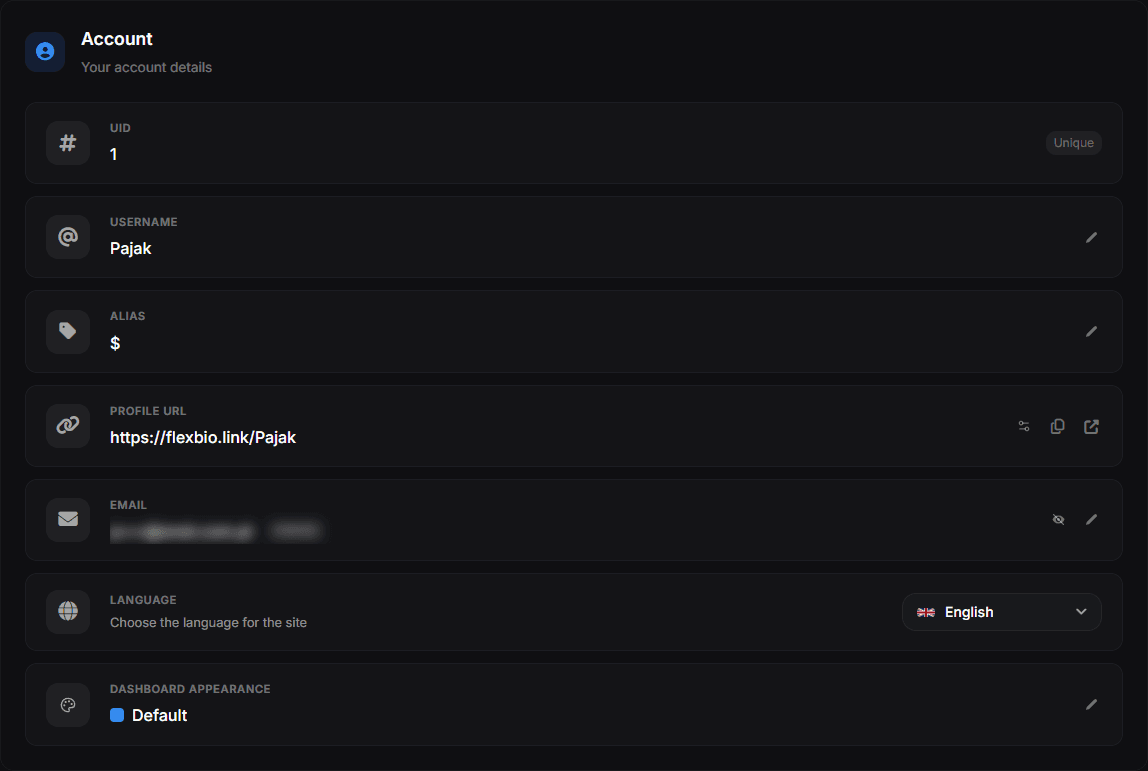
- UID — your account number, assigned at sign-up and marked Unique. It cannot be changed
- Username — your public address. The pencil on the right opens the change dialog
- Alias — a second, shorter address pointing at the same profile
- Profile URL — the full link, with buttons to copy it and to open it in a new tab
- Email — masked by default; the eye reveals it, the pencil changes it. The Verified tag shows the address is confirmed
- Language — the site language, applied to the dashboard and to this Help Center
- Dashboard appearance — the dashboard's accent colour; only you see it and your profile does not change
Username
Your username is your public URL. Availability is case-insensitive, so Pajak and pajak are treated as the same username. Changing it:
- immediately frees the old username for anyone else to claim,
- breaks every link you have already shared,
- does not affect your links, uploads, badges or analytics history.
Usernames must be unique. If the field rejects your choice, it is already taken.
Email address
The email address is used for sign-in, password resets and important notices. After changing it you must confirm the new address before it becomes active — until then the old address stays in effect.
Password
Passwords must be at least 8 characters. After a successful change you are signed out of the current session and asked to sign in again with the new password; do this on purpose rather than while mid-edit.
If you registered through Discord and never set a password, use the password reset flow once to create one. That gives you a second way in if you ever lose access to the Discord account.
Language
flexbio.link is available in 10 languages. The language you pick applies to the dashboard and the site chrome; the content of your own profile is never translated. This Help Center follows the same choice — set it here or from the globe icon in the header.
Dashboard appearance
Dashboard appearance sits under Language. It sets the accent colour of the dashboard — buttons, switches, sliders, the sidebar and charts. Only you see it: your public profile does not change. Restore default brings back the standard blue.
Deleting things
Delete actions in the dashboard are permanent and are always behind a confirmation dialog: images, folders, links, templates, badges and audio files cannot be restored after deletion.
What is not here
- Two-factor authentication and sessions → Security and 2FA
- Linking or unlinking Discord → Discord Connection
- Getting back in when you are locked out → Account Recovery