
Visuals
The Visuals tab — card effect, page FX, background overlay, cursor, click, views animation and card border effect.
Open Customize → Profile → General and switch to the Visuals tab. It holds the effects that stay on while someone is looking at your profile. What happens before the profile appears — the entry gate and the entrance animation — is in Entry.
The Effects card lists one setting per row — the description on the left, the control on the right — grouped under small headings.
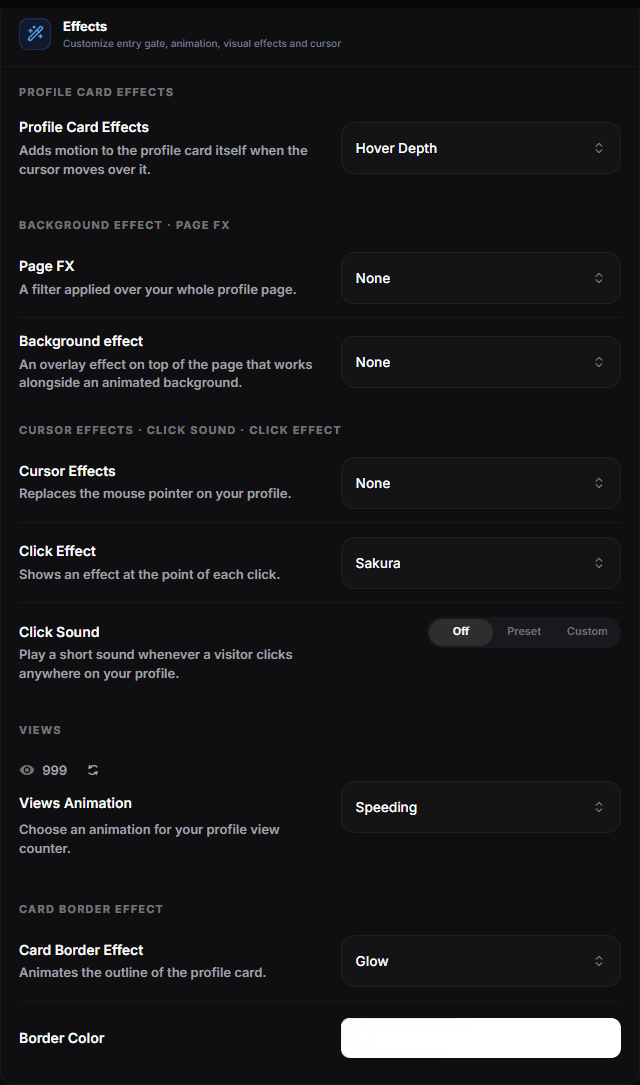
- Profile Card Effects — how the card reacts to the cursor
- Page FX — a filter laid over the whole profile page
- Background effect — an overlay on top of the page that works alongside an animated background
- Cursor Effects — what the cursor does on your page
- Click Effect — what a click leaves behind — None, Sparkle, Sakura, Hearts, Sparkles, Confetti, Fireworks, Lightning, Snowflakes, Rainbow Glitter or Stars
- Click Sound — Off, a Preset sound, or a Custom file you upload
- Views Animation — how the view counter counts itself in, with a live preview above
- Card Border Effect — the treatment of the card outline, with Border Color below it
Profile card effects
How the whole card reacts to the cursor. Only one is active at a time.
| Effect | What it does |
|---|---|
| None | No card effect |
| 3D Tilt | Tilt effect on card hover |
| Hover Depth | Smooth layered depth effect that shifts with your cursor |
| Floating Depth | Gently lifts, shifts and rotates the card with your cursor |
| Glare | Light sweep across the card on hover |
| 3D Pendulum | The whole card swings with inertia and gently settles |
| Magnetic Elements | Avatar, badges and links are drawn toward the cursor |
On touch devices, hover effects are mostly invisible — do not build your design around one.
Page FX and background effect
Two independent layers — you can have both on at once, together with an animated background or your own media.
Page FX is a filter over the whole page: Noise, Retro, Dots, Flying Stars, Flashing Crosses, Rain, Scanlines, Glitch or Thunder.
Flying Stars sends glowing pixel stars flying across the page, and Flashing Crosses scatters small white cross-shaped flashes that blink in and out.
Background effect is an overlay drawn on top of the page: Snowflakes, Rain, Blurred, Nighttime, Old TV, Fireflies, Bubbles, Matrix, Sparkles, Money Rain, Hearts Rain, Crypto Rain, Thunder, Starry, Shooting Stars and Pixel Snow.
Where did the animated backgrounds go?
The large configurable shader backgrounds — Aurora, Silk, Plasma, Liquid Flow, Metallic Swirl, Neural Tunnel and the rest — are chosen in the General tab: Media → Background → Animated. Their colours and sliders open right there. See General.
Cursor effects
Replaces or decorates the mouse cursor while a visitor is on your profile: Snowflakes, Rain, Image Trail, Ghost, Fairy Dust, Canvas Cursor, Fluid Cursor and Cat. Invisible on touch devices, so treat it as a bonus rather than a core part of the design.
Ghost draws a soft, glowing trail in your accent colour that follows the cursor like a wisp of smoke and fades out behind it.
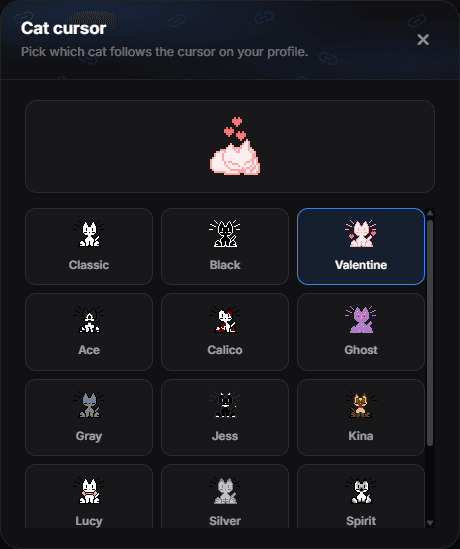
Cat is the one cursor effect with settings of its own: a pixel cat that chases the cursor, naps when left alone, washes itself and scratches at the edges of the screen. Picking it opens the chooser straight away; to come back to it later, click the sliders icon on the Cat row.
Click effect and click sound
Click Effect is what a click leaves behind on the page — None, Sparkle, Sakura, Hearts, Sparkles, Confetti, Fireworks, Lightning, Snowflakes, Rainbow Glitter or Stars. Each one draws its particles where you clicked and clears itself when the animation ends.
Sparkle and Lightning are drawn in your accent colour — and in every colour of it when the accent is a gradient. Rainbow Glitter uses the same texture as the rainbow sparkle name effect.
Click Sound is a three-way switch:
- Off — no sound.
- Preset — pick one of the built-in sounds: Alert, Ascend, Blip, Bubble, Buzzer, Chime, Knock, Sparkle, Success, Swoosh or Tick.
- Custom — Upload sound and use your own short file.
Sound needs a click first
Browsers block audio until the visitor interacts with the page, so the first click is the one that unlocks the sound. That is also why a click sound is best kept quiet and short.
Views animation
How the view counter on the card counts itself in. It applies wherever the counter sits on your card. The counter above the list plays the selected animation, and the refresh icon next to it replays it.
| Option | What it does |
|---|---|
| None | Shows the number straight away, with no animation |
| Count Up | Counts up from zero to your total views |
| Digit Roll | Rolls each digit into place with a smooth mechanical motion |
| Slot Roll | Drops each digit through a short slot-machine reel |
| Speeding | Accelerates to your total with a horizontal motion blur |
| Decode | Scrambles each digit through random numbers before it locks into place |
| Flip Clock | Flips each digit down like a split-flap clock |
| Light Streak | Light travels across each digit from left to right |
| Digit Jump | Each digit jumps once from below and settles into place |
| Keystrokes | Digits appear one by one with a short keypress motion |
Card border effect
An animated treatment of the card outline, with its own Border Color below it.
| Effect | What it does |
|---|---|
| None | No animated card border |
| Electric | Animated electric border |
| Glow | Rotating border glow |
| Aurora | Flowing aurora-coloured border |
| Rainbow | Spinning rainbow conic border |
| Pulse Glow | Pulsing border glow |
| Shimmer | Diagonal light sweep around the border |
| Comet | A glowing comet with a fading tail circles the card |
| Twin Comets | Two comets circle the card in opposite directions and flare as they pass |
| Starlit | Stars twinkle along the edge over a softly flowing line |
| Fairy Lights | A string of Christmas lights along the edge that follows the card’s corner radius |
Aurora and Rainbow bring their own colours, so for them the colour picker is replaced by a preview. The colour is greyed out while the effect is None.
Fairy Lights has its own palette too, so it also shows a preview instead of the colour picker.
Restraint reads as quality
Card effect + border effect + background effect + cursor effect all at once looks noisy. Pick one focal effect and let the rest stay quiet.
Text effects
Text effects are picked where the text is edited, in the General tab: the gear icon inside the Display Name field for your name, and the Customize button under the Description for your bio. Options range from subtle (a slow shine) to loud (colour cycling, glitch). One is plenty.
Effects cost performance
Animated backgrounds, page FX and cursor trails run on the visitor's device. Stacking several of them makes the page stutter on mid-range phones, which is where most of your traffic is. If your profile feels sluggish, remove effects one at a time until it is smooth.
Looking for the glow switches?
Username Glow, Socials Glow and Badges Glow are not here — they live in the Appearance tab under Glow Effects.
Try before you commit
Every effect and every slider is available in the Playground, rendered through the real profile renderer. Test combinations there, then apply the ones you keep.