
Create Your Profile
Register an account, claim your username, and get a presentable profile in a few minutes.
You need an account before you can edit anything. Registration is free and you can sign up with an email address or with Discord.
Register an account
- Open flexbio.link and choose Sign up.
- Register with an email and password, or continue with Discord.
- If you registered with email, confirm the address from the message we send you. Unverified accounts cannot publish a profile.
- Pick your username — this becomes your public URL,
flexbio.link/username.
Choose the username carefully
Your username is your public address. You can change it later from Settings, but the old URL stops working immediately and anyone can claim it afterwards.
Fill in the basics
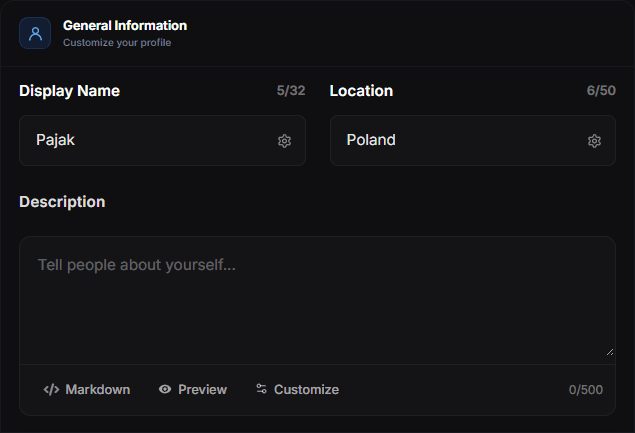
Open the Dashboard, then Profile → General. The three fields that matter most:
- Display name — the large name on your card. It can differ from your username.
- Bio / About — a short description. Keep it to one or two lines; long text pushes your links below the fold.
- Avatar — a square image works best. Upload it directly; it is stored on your account.
Save, then use View Profile to see exactly what a visitor sees.
Add your first links
Go to Links and add the destinations you care about. Each link has a title, a URL and an optional icon, and you can drag entries to reorder them. Two or three strong links convert better than a wall of buttons.
For platforms with a recognisable logo — Discord, Spotify, GitHub, TikTok, Telegram, Steam — use Socials instead. Those render as compact icons rather than full-width buttons.
Make it yours
Once the content is in place, move to Customize:
- Appearance and Colors set the card, background and accent colours.
- Layout decides the order of the sections and which ones are visible.
- Effects adds text, cursor, entrance and background effects.
Not sure what a setting does? Try it in the Playground first — it renders a real preview without touching your live profile.
Publish and share
There is no separate publish button: saved changes are live. When you are happy with it, read Share Your Profile for the best ways to distribute your link.