
Dashboard Tour
Where everything lives in the dashboard sidebar and the profile editor, and which section to open for which change.
The dashboard sidebar is split into three groups: Main, Customize and Tools. Everything you can change lives in exactly one of them.
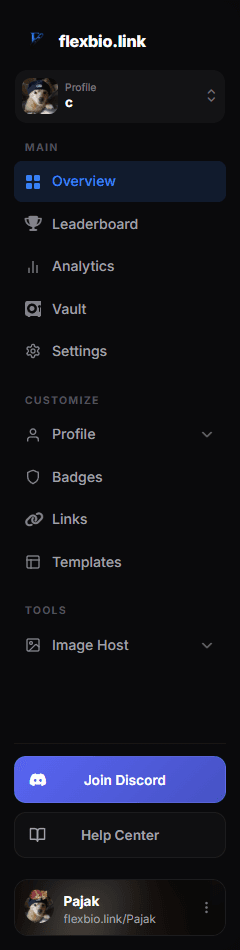
The profile selector directly below the flexbio.link logo switches the active version. Open it and choose Manage Profiles to create, duplicate, rename, reset or delete versions. See Profiles.
Main
| Section | What it is for |
|---|---|
| Overview | Your account at a glance — username, alias, UID, views, profile setup and quick actions |
| Leaderboard | Where you rank against other profiles by views |
| Analytics | Views over time, countries, devices and most clicked socials |
| Vault | Your purchased usernames, aliases and UIDs |
| Settings | Username, email, password, security and account actions |
Customize
This is where you build the profile itself.
| Section | What it controls |
|---|---|
| Profile | The profile editor — expands into its own pages, see below |
| Badges | Which badges show, their order and tint, plus custom badges |
| Links | Your link buttons and the social icon row |
| Templates | Apply a community template or publish your own |
The Profile group
Click Profile to expand it. It stays open while you are on any of its pages.
| Page | What it controls |
|---|---|
| General | The profile editor with its four tabs (below) |
| Layout | The profile layout, avatar shape, positions, the profile card, width and zoom |
| Sections | The modules of the Portfolio and Sidebar layouts |
| Metadata | The title, description and image shown when your link is pasted somewhere |
| Widgets | Live cards for games and platforms |
| Embeds | Playable Spotify and SoundCloud tracks and playlists |
The profile editor tabs
General opens the profile editor with a tab bar at the top and a live preview of your profile on the right.
| Tab | What it holds |
|---|---|
| General | Display name, location, description and tags; avatar and decoration, top-right decoration, background, banner, cursor and audio — see General |
| Appearance | Colors, fonts, the glassmorphism sliders, glow effects and display options — see Appearance |
| Visuals | Card effect, page FX, background overlay, cursor, click, views animation and card border — see Visuals |
| Entry | The entry gate, its personalisation and the entrance animation — see Entry |
The breadcrumb at the top of the page always shows where you are, for example Customize › Profile › Visuals.
Tools
- Image Host — expands into Overview, Upload, Gallery, Folders, Automations, API and Settings for the files you host on your account. See Image Host and Automations.
Saving
Changes save as you make them. A toast confirms the change ("Effect saved!", "Template applied!"). If you do not see the toast, the change did not save — check the field it complained about and try again.
The live preview is close, but the profile page is the truth. Open your profile after any visual change — hover effects and entry gates are easiest to judge there.