
Templates
Apply a community template, create your own from your current profile, and share it.
A template is a saved profile configuration. Applying one replaces your current design with someone else's; creating one publishes yours for other people to use.
The template library
Customize → Templates shows the library, plus your Favorite Templates and Last Used Templates. Browse the community templates, favourite the ones you like, and filter by author.
Applying a template
- Open a template and choose Use Template.
- Pick which parts to take. The dialog groups them into Media, Appearance, Layout and Components, each broken down further — avatar, background, banner, cursor, colours, fonts, card, effects and so on.
- Confirm with Apply selected. The page refreshes with those parts applied.
Only the parts you tick are overwritten
Everything you tick replaces what you have now, and the old setting is gone. Save your own template first if you might want the current design back. Your links and bio are never touched.
Create your own
Create Template builds a template from your current configuration.
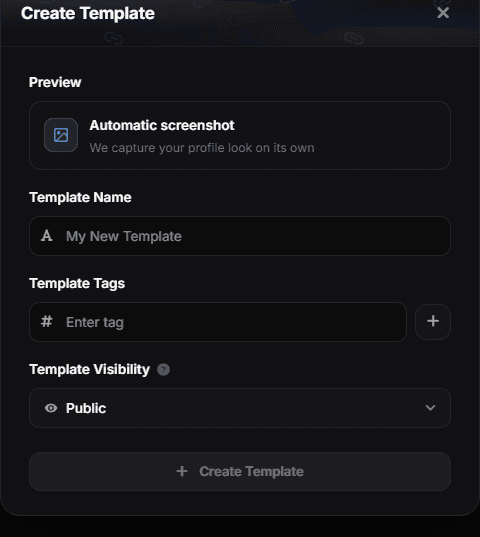
Three fields, and none of them is an image upload:
- Template Name — how it is listed in the library.
- Template Tags — keywords people filter by. Add them one at a time with the + button.
- Template Visibility — Public lists it in the community library, Unlisted keeps it out of the library while anyone with the link can still open and use it, and Private keeps it to yourself.
Get the profile exactly how you want it before opening this dialog — the snapshot is taken at creation time.
You can update a template later, and delete it if you no longer want it published.
The preview image
You do not supply one. Automatic screenshot means flexbio captures your profile as it looks at that moment, and that capture is what everyone sees in the library — which is the real reason to finish the design before you create the template.
Templates and your content
Templates carry design, not data. Applying one never touches your links, socials, uploads or badges — and publishing one never shares them.