
Metadata
The title, description and image other apps show when someone pastes your flexbio link.
Metadata is what Discord, X, Telegram, iMessage and search engines read when your URL is shared. It does not appear on your profile — it appears everywhere your profile is mentioned.
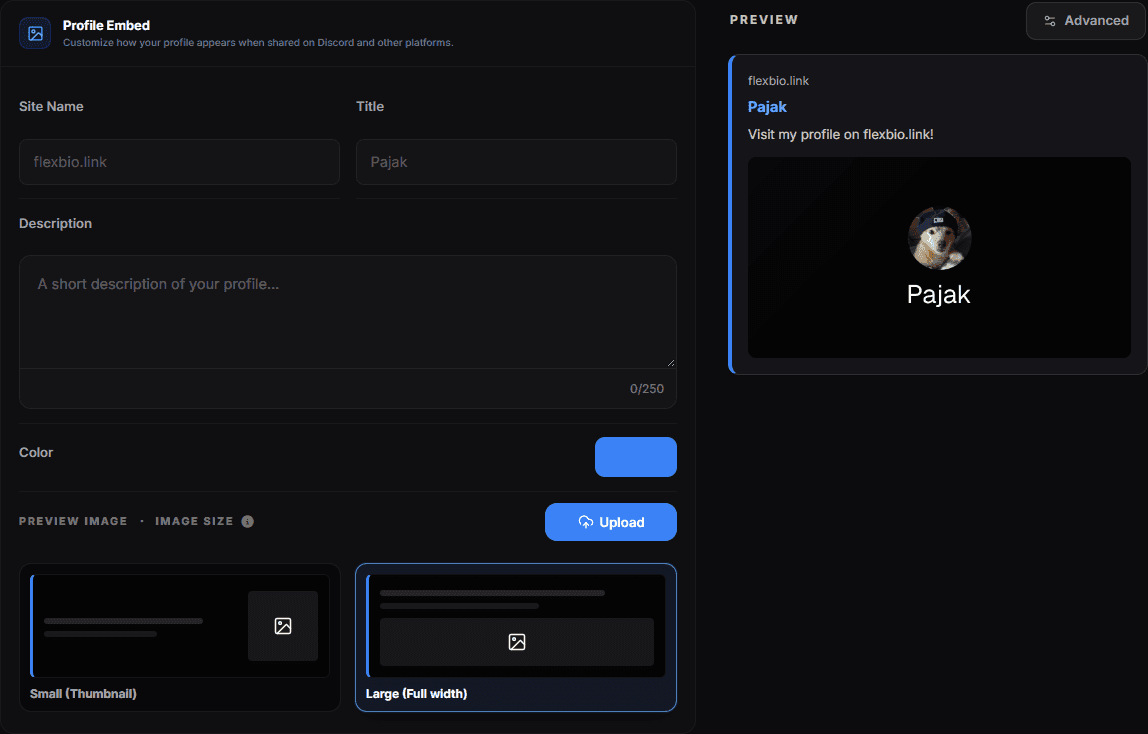
- Live preview — how the link renders once pasted — the coloured bar on its left edge is the Color field
- Site Name — the small line above the title in the preview
- Title — the bold heading of the preview card
- Description — the sentence under the title
- Color — the accent stripe down the left edge of the embed
- Image Size — Large (Full width) shows the image as a banner; the smaller option puts it beside the text
- Image — the thumbnail itself — Replace Image swaps it, the bin removes it
The three fields
| Field | Where it shows |
|---|---|
| Title | The bold heading of the preview card |
| Description | The line of text under the title |
| Image | The thumbnail (or large image) in the preview |
Writing them
- Title — your name or handle. Not "flexbio.link profile".
- Description — one short sentence. Long text is truncated differently by every platform, so front-load what matters.
- Image — high contrast, few words. It is displayed small in most chat clients.
Embed version
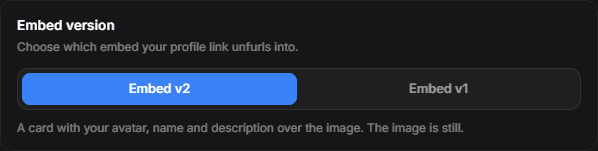
Under Advanced you choose which of two embeds your link unfurls into.
| Version | What gets sent |
|---|---|
| Embed v2 | A card we compose: your avatar, name and description drawn over your image |
| Embed v1 | Your image on its own, nothing drawn on it |
The difference that usually decides it is animation. The v2 card is rendered to a PNG, and a PNG is a single frame — so an animated GIF arrives frozen on its first frame. v1 points straight at the file you uploaded, so it keeps moving.
You cannot have both
An animated background and the avatar/name/description card are mutually exclusive. The link can advertise one image, and a composed card is by definition still. Pick the one that matters more for how you share your profile.
Choosing v1 hides the overlay options below it — views, hide avatar, hide name, hide description and the layout picker all draw onto the composed card, and v1 has no card to draw on. Switch back to v2 and they return with your settings intact.
If v1 is selected but you have not uploaded an image, the composed card is sent instead, so your link never unfurls without a picture.
Embed image extras
The embed image can also show your profile view count, and you can choose where that counter sits on the image (Views position). Turn it off if you would rather not display the number.
Previews are cached by the other platform
After changing metadata, Discord and most social apps keep serving the old preview for a while — sometimes hours. Nothing is wrong with your profile; the cache belongs to them, not to us. Testing in a different chat or channel sometimes forces a fresh fetch.
Checking your preview
Paste your link into a private Discord channel or a note to yourself. That is the same fetch a visitor's client makes, and it is the only reliable way to see what people actually get.
Search engines
The same fields feed search engine results. A descriptive title and a real sentence in the description do more for how your profile is listed than any other setting on the site.
Favicon and animated title
Under the embed card sits Custom Favicon. Its three settings change the browser tab your profile opens in, not the link preview above.
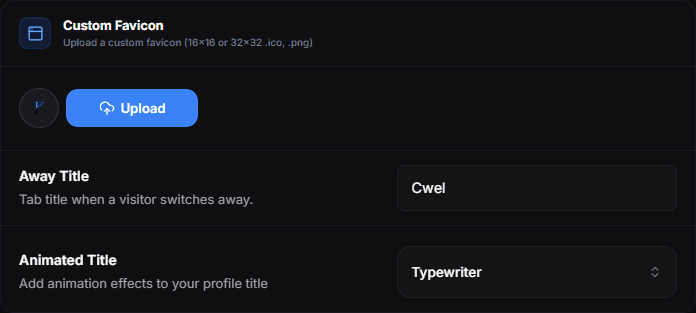
Custom Favicon replaces the flexbio.link icon in the tab with your own file — a 16×16 or 32×32 .ico or .png.
Away Title replaces the tab title while a visitor has another tab open, and the real title comes back as soon as they return. Leave the field empty and the title never changes.
Animated Title animates the tab title. The styles are Typewriter, Slide, Bounce, Rainbow, Glitch, Wave, Matrix, Neon, Blink, Marquee, Ping Pong, Loading Dots, Brackets, Orbit, Hacker Decode, Scanner, Binary, Signal and Cipher; leaving it off keeps a plain title.