
Entry
The Entry tab — the profile entry gate, personalising Boot, Linux and Flexbio Classic, and the profile animation.
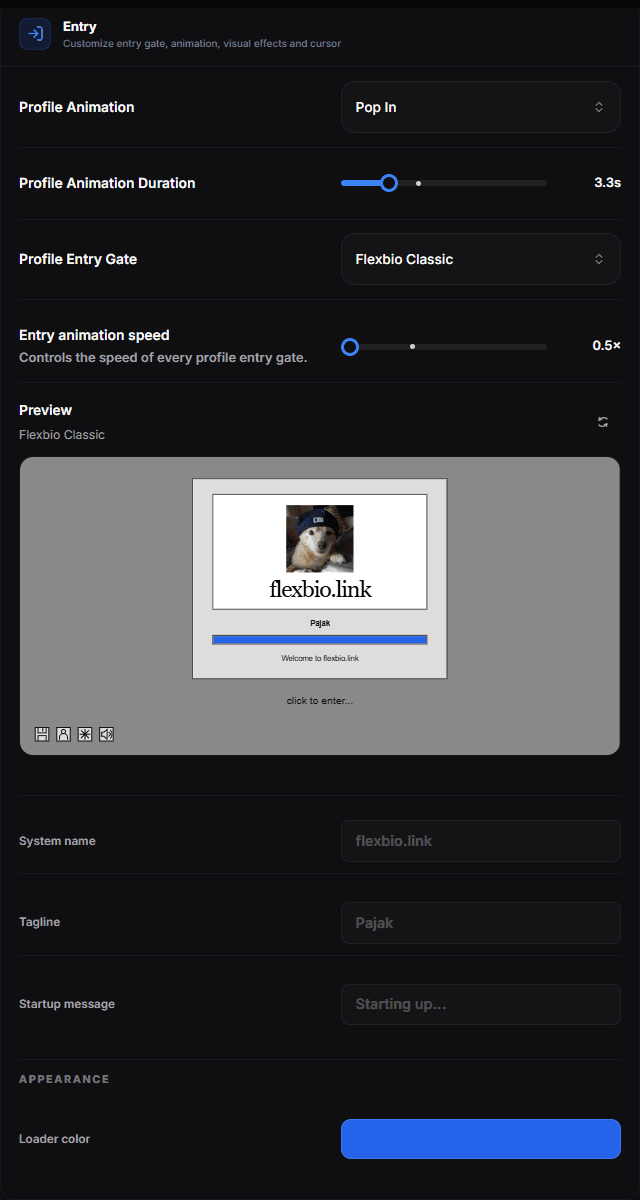
Open Customize → Profile → General and switch to the Entry tab. The Entry tab holds the gate a visitor passes before your profile and the animation the profile arrives with. A preview at the bottom plays the gate you picked — click it to watch it open onto your background.
Profile entry gate
None skips the gate and shows the profile straight away. The other gates:
- Classic, Split, Slide Up, Slide Right, Katana, Spotlight and Lens — simple "click to enter" screens that get out of the way in different ways.
- Terminal — a console-style screen with a progress readout before the profile opens.
- Boot, Linux and Flexbio Classic — system-style boot screens you can personalise.
Entry animation speed (0.5× to 2×) is shared by every gate.
Personalising Boot, Linux and Flexbio Classic
Pick one of these three and its settings appear under the preview, so every change is visible straight away:
| Field | What it changes |
|---|---|
| System name | The name the fake system boots as — flexbio.link by default |
| Tagline | The line under it — your username by default |
| Boot messages | Three log lines printed during boot (not used by Linux) |
| OS color | The console log colour (Boot) |
| Success / Failure color | The coloured status labels in the Linux log |
| Loader color | The loading bar (Boot, Linux) and the Flexbio Classic screen |
Only the colours the chosen gate actually uses are shown.
Profile animation
How the profile arrives on screen once the gate is gone. Default is the plain appearance; the rest are:
Parallax, Fade In, Slide Up, Slide Down, Slide Left, Slide Right, Zoom In, Zoom Out, Blur In, Flip In, Flip Y, Bounce, Swing, Rotate, Elastic, Glitch, Cascade, 3D Depth, 3D Orbit, Shockwave, Unfold, Pop In, Staged Zoom and Digital Glitch.
Profile Animation Duration sets how long that entrance takes. Animations without an adjustable length leave the slider disabled. Keep it short — a visitor who has to wait to read your links often does not wait.
Try before you commit
Every effect and every slider is available in the Playground, rendered through the real profile renderer. Test combinations there, then apply the ones you keep.